
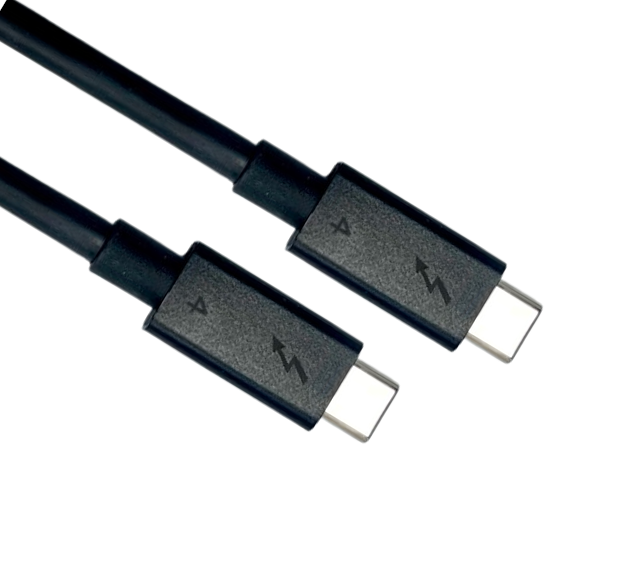
USB Cable Assembly starts with the data rate and current rating, while HDMI Cable Assembly starts with the bandwidth category. The certification bodies and requirements also differ.
A requirements sheet may include both USB and HDMI cables. Both consist of a cable with connectors at each end but the specifications that must be decided first differ. If a requirement is omitted, the prototype may not meet the required performance level and may need to be remade.
Connectors and Cable Categories: Different Classification Methods
USB cables are classified by data rate and current capability. Cables with the same Type-C connectors can differ significantly internally. For HDMI cables, the connector form is selected to suit the device size and the cable category is selected by bandwidth.
| Comparison | USB Cable Assembly | HDMI Cable Assembly |
|---|---|---|
| Connector form | The complete USB Type-C Connector receptacle interface has 24 contact positions and supports reversible insertion. Actual plug contacts and wiring depend on the cable type. | Type A has 19 contacts. Type C (Mini) and Type D (Micro) are used in portable devices, while Type E is used in automotive applications. |
| Cable classification | Select by data rate and power capability. Common rates include USB 2.0 (480 Mbps), 5, 10, 20, 40 and 80 Gbps. For Type-C to Type-C cables, also confirm 3 A at 20 V (60 W) or 5 A at 48 V EPR (240 W) capability. A 5 A rating alone does not establish 240 W support. | Common bandwidth categories include Standard, High Speed, Premium High Speed, Ultra High Speed and Ultra96. Ethernet and automotive variants also exist. |
The USB Type-C Connector has a standardised mating form, so specifying only “Type-C cable” does not define its performance. The requirements must state the combination of data rate and current rating. The HDMI Connector form depends on the space available in the device, so the requirements must specify the connector type and bandwidth category.
Also note that a Type-C cable wired only for USB 2.0 can carry data and power but cannot carry DisplayPort Alt Mode video. If the product outputs video through this mode, select a full featured cable that supports the required video mode and bandwidth. The device and dock must also support the same mode.
E-Markers in USB Cables: Current and Speed Determine Whether One Is Required
An e-marker is a small chip inside a Type-C cable connector. Devices use it to identify the capabilities supported by the cable.
For detachable cables with Type-C connectors at both ends, not every cable needs this chip. A cable supporting only USB 2.0, rated for 3 A and limited to the Standard Power Range (up to 60 W at 20 V) may omit it. Cables rated for 5 A and full featured Type-C cables supporting higher data rates must include an e-marker. This rule must not be applied indiscriminately to legacy interface cables such as Type-C to Type-A cables.
The drawing must therefore define both data rate and current rating first. These determine whether the cable needs a chip and whether another component must be added to the BOM.
HDMI Cable Bandwidth Categories: Confirm the Device’s Actual Requirements First
Select the HDMI cable category according to the amount of data the device actually needs to transmit, rather than the HDMI version listed in the datasheet.
For a link requiring the full 18 Gbps bandwidth, choose a certified Premium High Speed cable. For an FRL link requiring more than 18 Gbps and up to 48 Gbps, select an Ultra High Speed cable. Gbps means billions of bits per second. The HDMI 2.0 or HDMI 2.1 version name alone does not determine the required cable category.
Labelling can be confusing. A product using an HDMI 2.1 Connector and claiming HDMI 2.1 support does not necessarily operate at 48 Gbps. Added features such as VRR and ALLM, along with the supported FRL rates, must be checked individually. The device may still use TMDS at up to 18 Gbps. HDMI 2.1 reaches 48 Gbps through the newer FRL transmission method, while retaining TMDS for backward compatibility.
First confirm with the device manufacturer whether the link actually uses FRL or TMDS, then decide whether the cable needs Premium High Speed or Ultra High Speed performance. If an HDMI 2.2 device requires more than 48 Gbps, select the Ultra96 category, which supports up to 96 Gbps.
Certification: Connectors Must Be Approved Before Cable Certification
When submitting a USB cable for certification, each connector must already have a certification ID. HDMI cable connectors must first appear on the approved connector list.
| Comparison | USB Cable Assembly | HDMI Cable Assembly |
|---|---|---|
| Connector prerequisites | USB-IF requests the TID (certification ID) for each connector in the cable and verifies that it is certified. | HDMI Connectors must appear on the HDMI Approved Connector list for the assembly to pass HDMI compliance testing. |
| Cable testing | Test according to the USB Type-C cable and connector compliance documents. Cables with an e-marker also require cable testing under the USB Power Delivery compliance programme. | Ultra High Speed cables must pass testing at an HDMI Forum Authorized Testing Center (ATC), including low electromagnetic interference (EMI) testing. |
| Certification markings | Type-C to Type-C cables submitted for certification must carry the appropriate power logo. Cables other than USB 2.0 must also show their data rate. The laboratory checks these markings. | The packaging must show the cable category name. The Ultra High Speed certification label must be affixed to each package or unit of sale. |
Check the connectors before prototyping, then submit the cable for certification. If the completed cable uses connectors without certification IDs or the required listing, you may have to wait for connector approval or change the connectors and remake the cable.
Frequently Asked Questions
Q: Does a product still need separate certification if it uses a certified USB cable?
A: If the product is to obtain USB-IF certification, it must be submitted separately. A certified cable does not replace product certification. Cables and products are separate certification subjects: cable certification covers the connectors and cable assembly, while product certification covers the device. Prepare for each separately.
Q: Is there a maximum length for an HDMI Cable Assembly?
A: The HDMI specification does not set a maximum cable length. The practical length is limited by signal attenuation. Each length of an Ultra High Speed cable must be tested and certified separately. If the same cable model is offered in two lengths, both lengths must undergo certification.
Q: What information is stored in a Type-C cable’s e-marker?
A: The e-marker stores cable specification information, including the cable latency category, maximum supported current and voltage, supported data rate, vendor ID and product ID. The latency category should not be treated as an exact cable length. Devices read this information using USB Power Delivery communication over the CC channel, so the programmed values must match the actual cable specifications.
USB Cable Assembly and HDMI Cable Assembly Specifications: Define Performance Before Checking Certification
Before asking a manufacturer to prototype either cable, complete the requirements sheet. For USB cables, specify the data rate, current rating and whether the device outputs video. For HDMI cables, specify the connector type, bandwidth category and length. Also provide the connector certification IDs or approved list status for both cable types. When requesting a quotation from a Custom Cable Assembly Manufacturer, these details help determine whether an e-marker is required and which certification process applies. Walta Electronic offers both USB Cable Assembly and HDMI Cable Assembly products, so requirements for both can be submitted together. Please contact us for advice.
Walta Electronic
Tel: 886-2-2657-7778
Email: inquiry@walta.com.tw
Address: 3F-2, No. 15, Lane 360, Section 1, Neihu Road, Neihu District, Taipei City, Taiwan